
CosmoKey Licensing Process
CosmoKey is a professionally licensed desktop software product. Each purchase is associated with a unique license issued specifically to the customer. The licensing process is designed to ensure that every user receives a legitimate and secure copy of the software while protecting the integrity of the CosmoKey platform.
Below is a brief overview of how the licensing process works.
Licensing Model
CosmoKey uses a professional licensing system designed for long-term use.
License Type:
• Single user
• One computer per license
• Perpetual license (lifetime access for all features in a single license)
• License can be deactivated by user in old computer and reactivated on another new computer
Included with purchase
• Lifetime software license
• All current features and modules included
• Free updates for the current version line
• Discounted upgrades for future major versions
Your license can be deactivated and transferred to a new system if required by you without taking any support from us. (T&C apply)
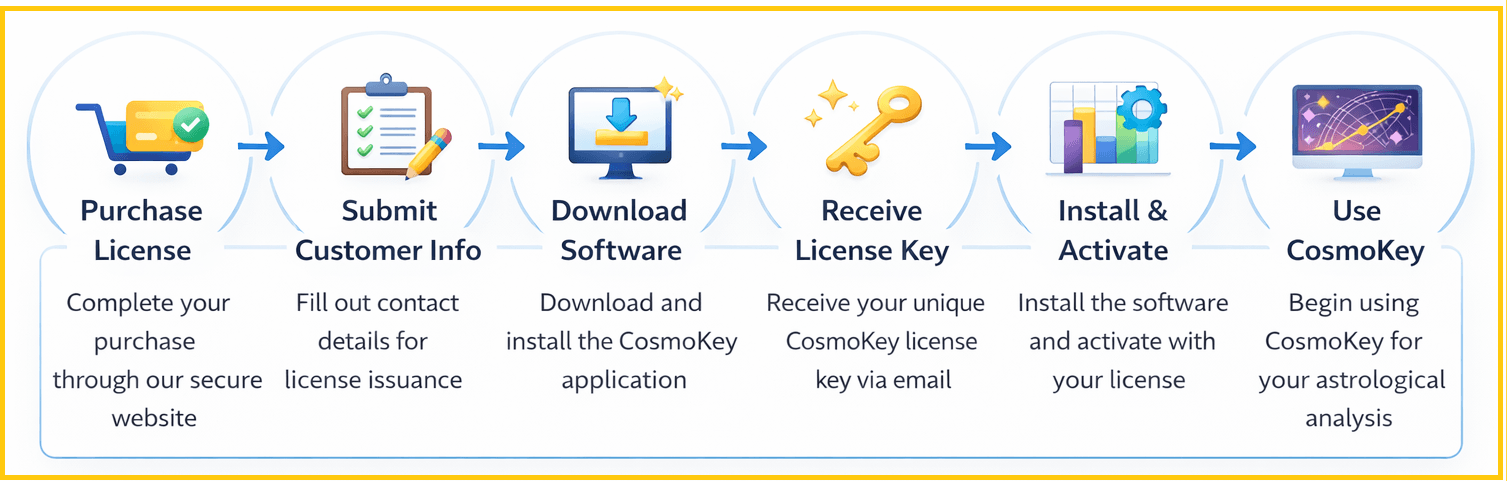
1. Purchase of CosmoKey License
Customers begin by purchasing the CosmoKey software license through the official CosmoKey website only. All orders originating within India are purchased through secured Razorpay payment gateway. All orders originating outside India (irrespective of nationality or country of birth) is purchased through secured PayPal payment gateway. Click here to buy. We do not have any reseller or agent to sell this software on our behalf.
Payments may be processed through 256 AES encrypted secure payment gateways depending on the customer’s location as mentioned above. Once the payment is successfully completed, the purchase is recorded in the CosmoKey licensing system.
2. Customer Information Submission
After completing the purchase, the customer is required to submit a short customer information form. This information helps us generate a personalized license record and maintain accurate licensing details for each user. The information collected typically includes basic identification and contact details associated with the license holder. All information collected are through encrypted forms and are kept strictly confidential.
3. Software Download
Customers are provided with access to download the CosmoKey software installer from the official website. You may need to wait upto 12-24 hours for the payment to be processed and submitted to us by the payment gateway.
The installer contains the complete CosmoKey application and the required components for installation on supported systems. The setup installer, setup guide, license key, training videos would be sent to the registered email ID of the customer.
4. License Issuance
Once the purchase and customer information have been verified, a unique CosmoKey license key is issued to the customer. This license key identifies the authorized user of the software and enables activation of the application.
The license key and related information are delivered to the customer electronically.
5. Installation of CosmoKey
The customer installs the CosmoKey software on their computer using the provided installer. An active internet connection is required during activation and throughout the running of the software.
The installation process prepares the application to run on the supported operating system.
During installation or first launch, the user is required to review and accept the CosmoKey Software License Agreement.
6. Software Activation
After installation, the user activates the software using the license credentials issued to them.
Activation verifies the authenticity of the license and links it with the user’s installation environment.
Once activation is successfully completed, the CosmoKey software becomes fully operational. However, an active internet connection must be maintained during the operation of the software.
7. Ongoing License Validation
CosmoKey uses a secure licensing system to periodically validate the license in order to maintain software integrity and prevent unauthorized distribution. This process runs automatically in the background and does not require any manual action from the user under normal circumstances. The license validation helps in processing the information through Large Language Machine processing in the backend servers.
Important Note
Each CosmoKey license is issued for use by an individual customer in accordance with the Software License Agreement. Sharing or distributing license credentials is not permitted and may result in suspension of the license.
Need Assistance?
If you have questions regarding licensing, installation, or activation, our support team will be happy to assist you.
Bhagyaratna Astrotech LLP
Ashok Niloy
77 Vivekananda Road
Barasat, Kolkata 700124
India
Email: contact@bhagyaratna-astrotech.com
Phone: +91 917 8907 558
(Mon–Fri 10 AM – 5 PM India Time)